You are able to select Unreceive an items on the right hand side of your Fulfillment tab.
You will scan the QR code to populate the item and select the reason you are marking the item as unreceive. If you do not have the physical QR code, you are able to copy it from the Order Item Page under Tasks.
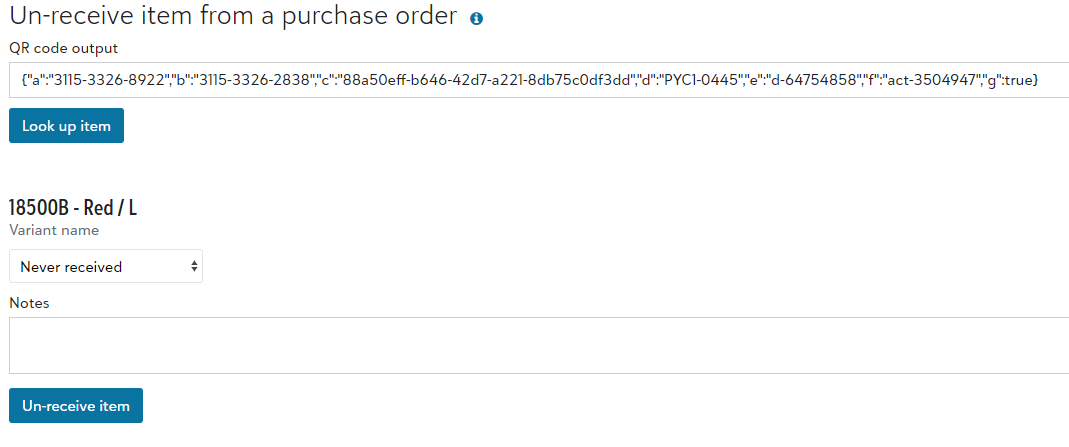
Once you unreceive an item, the status will be changed to Not Started and it will no longer be tied to the original PO. You are still able to see details, such as the original PO and the receive event on the item's audit trail.
If you have PSST with the suppliers, any unreceived items will show as a new PO in the original batch. That item will automatically go into a Priority 3 PO, unless the item is already a higher priority. This means it will be prioritized during receiving.
If you do not have PSST, the new PO will reflect under both the original and new batch. This allows us to meet the free shipping minimum for the PO, whereas having a PO just containing an item or two from the old batch would not. Any new unreceived items will be combined with other priority 3 POs.
If you unreceive an item and want to immediately replace it from inventory you have on hand, you can go to the Order Item Page and choose Tasks > Receive order item.
Unreceiving a DTF Transfer
If there is an issue with the transfer before application (missing or damaged), please reach out to STAHLS' customer service at 800.478.2457 or info@stahls.com for a resolution.
Similar to the blank good, if your warehouse is connected to STAHLS' for automated transfer ordering, in the event that an item is rejected after decoration or the transfer does not meet quality control standards, you are able to reorder the film within the system.
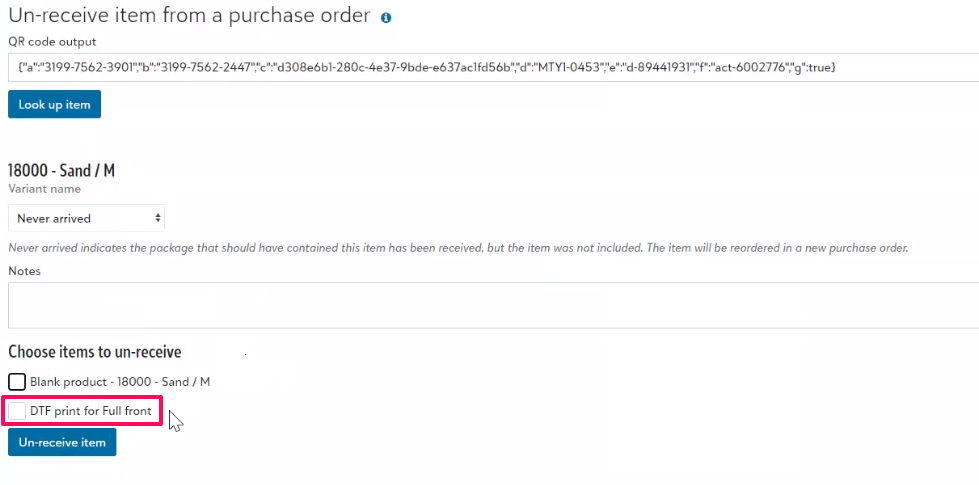
When you un-receive an item, you will have the option to reorder the garment, the transfer, or even both! If your order contains multiple transfers, they will be conveniently separated, giving you the freedom to easily reorder only what you require!
Once your request is submitted, it will enter the next batch for processing. When received into production, the replacement transfer will carry the identical code as the original, but with the added "REPLACEMENT" prefix.