For Decorator Pro doing in-house volume, shipping labels are generated from the connected ShipEngine account.
You are able to view or edit available shipping methods on the store's dashboard under Store configuration > Shipping methods. The shipping methods you add here, are what will be available to the end customer.
Using your customer's UPS or FedEx Account
You can extend the option to use either your customer's UPS or FedEx account. This is set on the Account level, and will automatically apply to all applicable orders using the carrier that run through that account.
This is done under Configuration > Third-party billing.

A service charge will apply to orders fulfilled through the FE Network when shipping is billed directly to a third-party carrier account. This charge reflects the administrative and operational handling requirements associated with processing shipments on external carrier accounts.
There is no additional charge for orders shipped on FE-managed carrier accounts.
Setting up Shipping options on a Store
Within the store, you will set shipping options under Store Configuration > Shipping Methods. The default is "standard shipping" - which is the most cost effective method based on the shipment details.
Free Shipping
You have the option to offer free shipping on White-Label stores.
When editing a shipping method, you are able to select free shipping either for the entire account, or by a dollar threshold > Save.
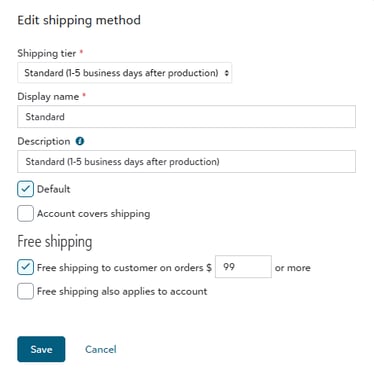
If the Account is covering the shipping cost, you will select "Account covers shipping." If selecting "Free shipping applies to the account," it means that you as the Sales Portal will not be invoicing the account for any shipping costs.
Pickup
For Decorator Pro, you have the ability to extend the option for pickups instead of shipping. This is only applicable for orders you are doing in-house and would not qualify for orders sent to the Network for fulfillment.
At the Mark produced station, instead of generating a shipping label a pickup slip will be printed.
This slip will call out that it is "Order Pickup" as well as;
- Order Number
- Store Name
- Pickup Name
- Any variable data (if applicable)
- for example - a student's name is required at checkout