This article is specific to STAHLS' Fulfill Engine Seller Essentials accounts.
To have access to White-Label stores, you will first to ensure our Accounting team has the below information on file. This allows us to pay your profits!
-
Copy of your W-9
-
A company or bank letterhead or a photo of a voided check
-
Fulfill Engine Account ID
This can be found in the format act-0000000 under the API key tile under Configuration or within the URL.
Once the above is compiled, it can be sent directly to Accounting at accounting@fulfillengine.com.
Create a White-Label Store
To create a white-label store, from your Account you will select Create a store.
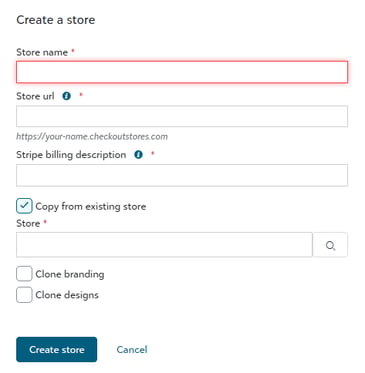
To create the store, you will be prompted to input the store's Name, URL, and Stripe billing description. A Stripe billing Description is an identifying text that will show on the end customer's bank statement.
Now you are ready to start building products!
Duplicating a White-Label Store
To create a white-label store, you will go to your customer's Account page from your Sales Portal, then select Create a store.
If you are wanting to duplicate an existing live store, you will select Copy from existing store when building the new one.
When you do this, all products and categories are duplicated. There is also an option to Clone the store's branding. You will just need to add art!