This article is specific to STAHLS' Fulfill Engine Seller Essentials accounts.
Once within the store, you are able to go to Store configuration and see the option for Branding. This is where you are able to take the template of the white-label store and customize it to your brand. Let's walk through it!
Store branding
Images
Branding logo: This will be the main imagery for your webstore and should be a company logo.
Hero image: This image will be displayed as a banner on your online store
> minimum 1900px wide and recommended 350-450px for height
Links
Home page URL: Connect a URL for your website that will be linked to from the webstore.
Contact email address: We recommend using a general email that connects to an inbox that is monitored by and individual, or individuals, who are tasked with supporting the webstore operation.
Email from name: Customize the name shown to your customers from the automated emails the system prompts for receipts and shipment notifications.
Storefront messages
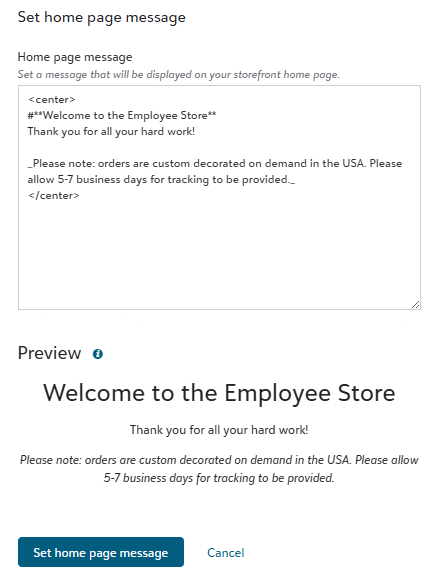
Home page message: You are able to set a message that will be displayed on your storefront home page.
General checkout message: This message that will be displayed on your storefront checkout page.
Terms and conditions: Set a terms and conditions message that will be displayed on your storefront checkout page.
Order success message: Set a message that will be displayed on your storefront order success page.
Control the formatting of messaging to alter how it is displayed on the store.
Center text: use <center> at the start of your text and </center> at the end
Heading 1: use # before the text you are wanting to call out
Heading 2: (smaller header) use ## before the text you are wanting to call out
Bullet List: use * in front of each bullet point
Bold: use ** at the start of your text and ** at the end
Italics: use _ at the start of your text and _ at the end
Strikethrough: use ~~ at the start of your text and ~~ at the end
Billing
Stripe billing description: Set a custom prefix billing description for each Stripe charge. This is commonly the store name or abbreviation for the end customer to easily recognize the charge on their bank statement.
Custom email message: Custom email message to be sent on order success.
Shipping Labels
Return address: Set up the white-label address that will reflect on all orders shipped from your store.
We are unable to use a PO Box as the return address.
This is unique to the store and not the account. This means that if you have multiple stores, you will need to establish the return address for each store.