The process for receiving orders from accounts with different SLAs is the same, although additional setup is required.
The option for SLAs is available on an account level. From your Sales Portal, you will select the dropdown option to the left of the account, and select Set order priority.
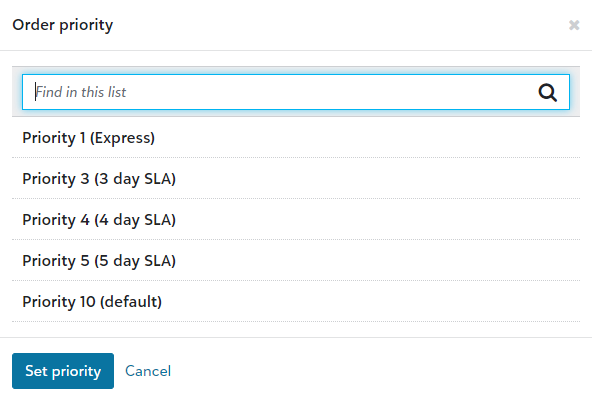
The number of priority options you offer, directly correlate to the number of thermal label printers and colored labels you will need to set up.
From your receiving station, you will Download the latest label printing app and a zip file will automatically download. Once completed, you will extract the files and locate PrinterApp. This will need to be installed on all receiving terminals.

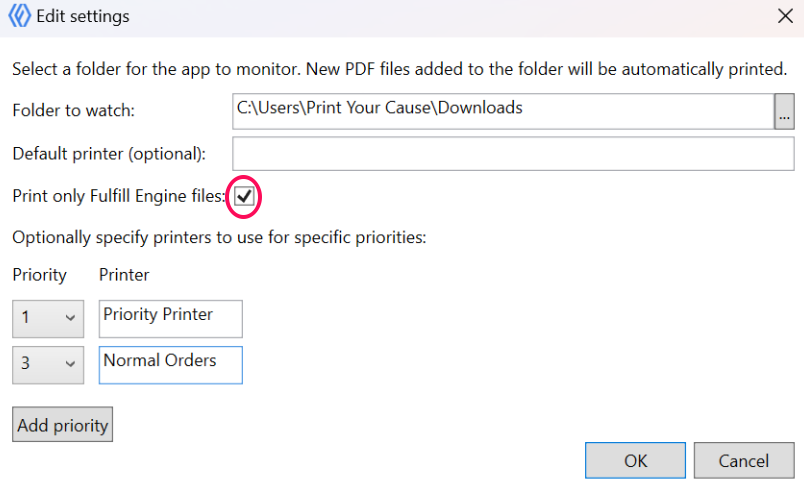
From file settings, you will have the option to list which priorities opens you are offering.
We recommend selecting the option to Print only Fulfill Engine files to ensure unrelated files within the hot folder do not download.
The name of the printer will need to match exactly what it is named in the computer's device manager.
When a PO is scanned, the system will automatically send to the thermal label printer with the correlating identifying color.