Sales
Rosters for white-label stores
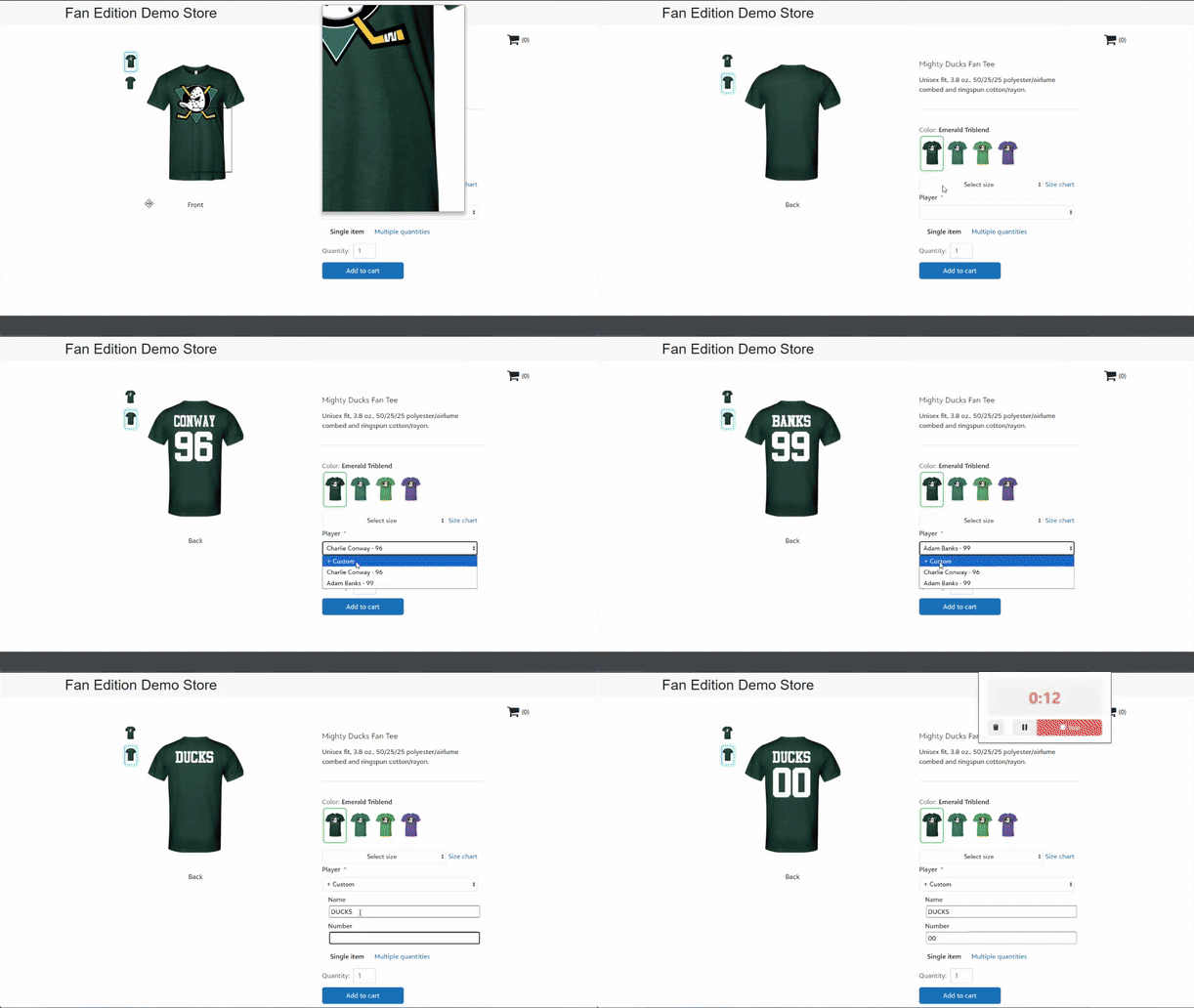
You and your customers can add rosters to a white-label store, so customers can quickly select a player to set the name and/or number on the customizable product.
To add and manage rosters, go to the Store configuration section of the store page. You can then add a roster to a product as a static text customization.
To learn more about how to use rosters in a white-label store, click here.
Customization pricing updates
Sales admins have a new option to price customizations for your accounts.
If you remove the Price per customization value from a price sheet, then accounts with that price sheet will be charged the per location price for the applicable decoration method on a store product customization. Embroidery customizations will be priced by stitch count.
If you'd like to continue charging a premium fee for customizations, no changes are needed.
Starting January 30, 2026, Fulfill Engine will stop charging the Per customization price for each customization on a Network-fulfilled store product. Instead, you will be charged the per location price for the applicable decoration method. Embroidery customizations will be priced by stitch count.
NOTE: Starting January 30, 2026, per customization fees set on an account's price sheet will no longer pass through to a fixed sales price store product.
Any stores offering customization products with fixed sales prices should either increase product prices accordingly or use product-level customization fees instead. To learn more, click here.
LIQUID 3D updates and advanced tips
We’ve made several updates to the LIQUID 3D real-time artwork builder experience, including:
-
Updated the LIQUID 3D color palette display values to better match the actual colors printed on LIQUID 3D emblems, allowing you to have more confidence that your 3D logo designs will look great when produced.
- Improved the auto-fix logic to detect more artwork file issues that could potentially cause production delays and to more effectively fix those issues.
- Fixed an issue so that artwork height and width dimensions, including the fabric background, are correct and consistent throughout.
-
Display tool tips to users while artwork files are loading and auto-fixing.
We also published a new help video on YouTube with advanced tips to prepare your vector artwork files for use with LIQUID 3D.
View and resolve invalid store products
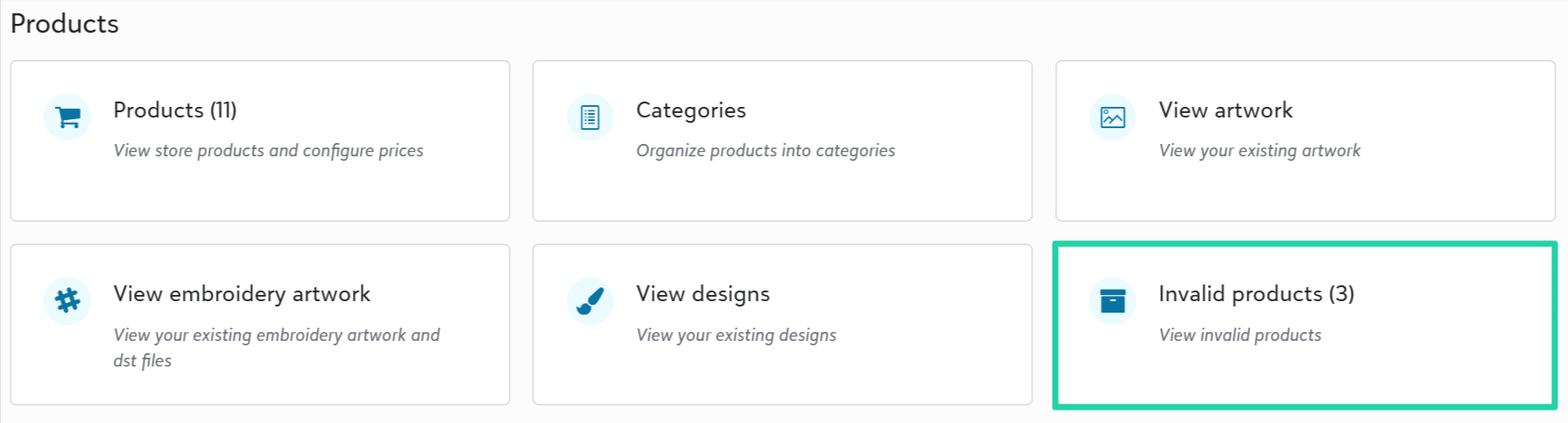
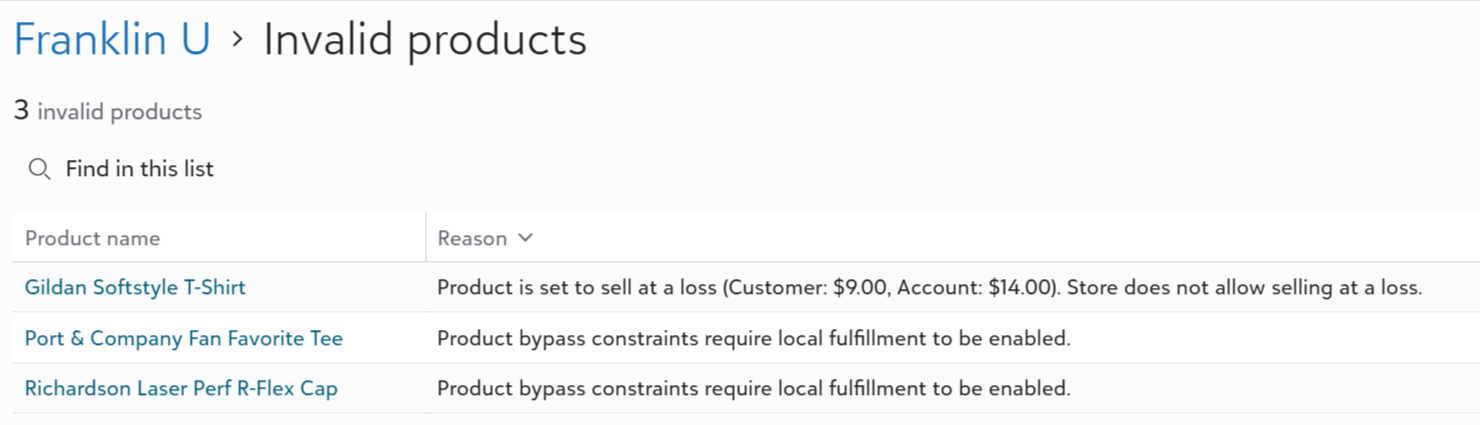
Store admins can access a new Invalid products page to view and resolve products that have been disabled from the store because of a configuration issue.
Currently, the page will list products that are invalid for the following reasons:
- Product bypasses constraints. Store does not have local fulfillment enabled.
- Product is set to sell at a loss. Store does not allow selling at a loss.
We’ll continue to identify scenarios in which adding products to this list would be beneficial for store admins. Additionally, we’ll work to ease resolution of any issues we’re flagging in this area.
Add customizations to OMG store products (for early adopters)
Currently in a closed Beta phase, participating OrderMyGear (OMG) store admins can add customization options to products including:
-
Personalization: customer types in their custom value
-
Static values: customer selects a value from a picklist
- Static values with personalization: customer selects a picklist value or types in their own
We intend to release this new feature to all OMGxFE customers in Q1 2026. Meanwhile, email info@fulfillengine.com to request early access.
Export order source and item product category
To help you better understand your volume, we've added new information to orders and order items exports:
- Source
- Product category
Replacement request approval notification
Users who submit a replacement request will now receive an email notification when the request has been approved. The solution already sends email notifications when a replacement request is denied.
View additional details in wallet history
Sales admins can now view more details on the Fulfill Engine wallet history page, including who performed a recent transaction, notes associated with a manual transaction, and the current wallet balance.
TaxJar Integration (for early adopters -- coming soon)
Select early adopters enrolled in a Beta release of our TaxJar integration in November.
The TaxJar integration offers more robust sales tax capabilities including:
-
TaxJar-powered sales tax calculations and collection on transactions in Fulfill Engine white-label stores and order portal.
-
Sales tax calculations and reporting at the state, county, city, and special district levels.
-
Sales tax reporting at the order line item level, including itemized export files matching Avalara's and TaxJar's import templates for customers using either third-party system for sales tax filings.
-
Order item-level sales tax exemptions, informed by tax codes assigned to Fulfill Engine catalog products (e.g., Apparel > T-shirts is assigned a 'Clothing' tax code).
After this Beta phase, we intend to roll this TaxJar integration out to all sales portal customers as an included capability (no additional cost). We intend to be generally available by February 2026.
Fulfillment
Segment purchase orders for replacements and reprints
The batch process now segments blank items for replacement orders and reprints (unreceived blanks) into their own purchase orders (POs), with a '-r' suffix as a visual indicator to help your team expedite these items through fulfillment.
To ensure this update does not result in unexpected supplier shipping costs, these orders will fall back to standard POs if a segmented PO would not qualify for free shipping on its own.

Retain PDF artwork files for DTF transfer prints
When a user or integrated order supplies a PDF artwork file for a DTF print, the system retains that original file format and assigns it to the DTF transfer job. Previously, the system would convert the file to PNG for production.
This update is intended to improve DTF transfer print quality including color matching. The same logic will soon be applied to SVG files.
Move item(s) to new shipment
Warehouse admins can now move one or more order items into a new shipment. This new task to split shipments can help ensure the majority of a customer's orders ship out on time, when one or some items are delayed.
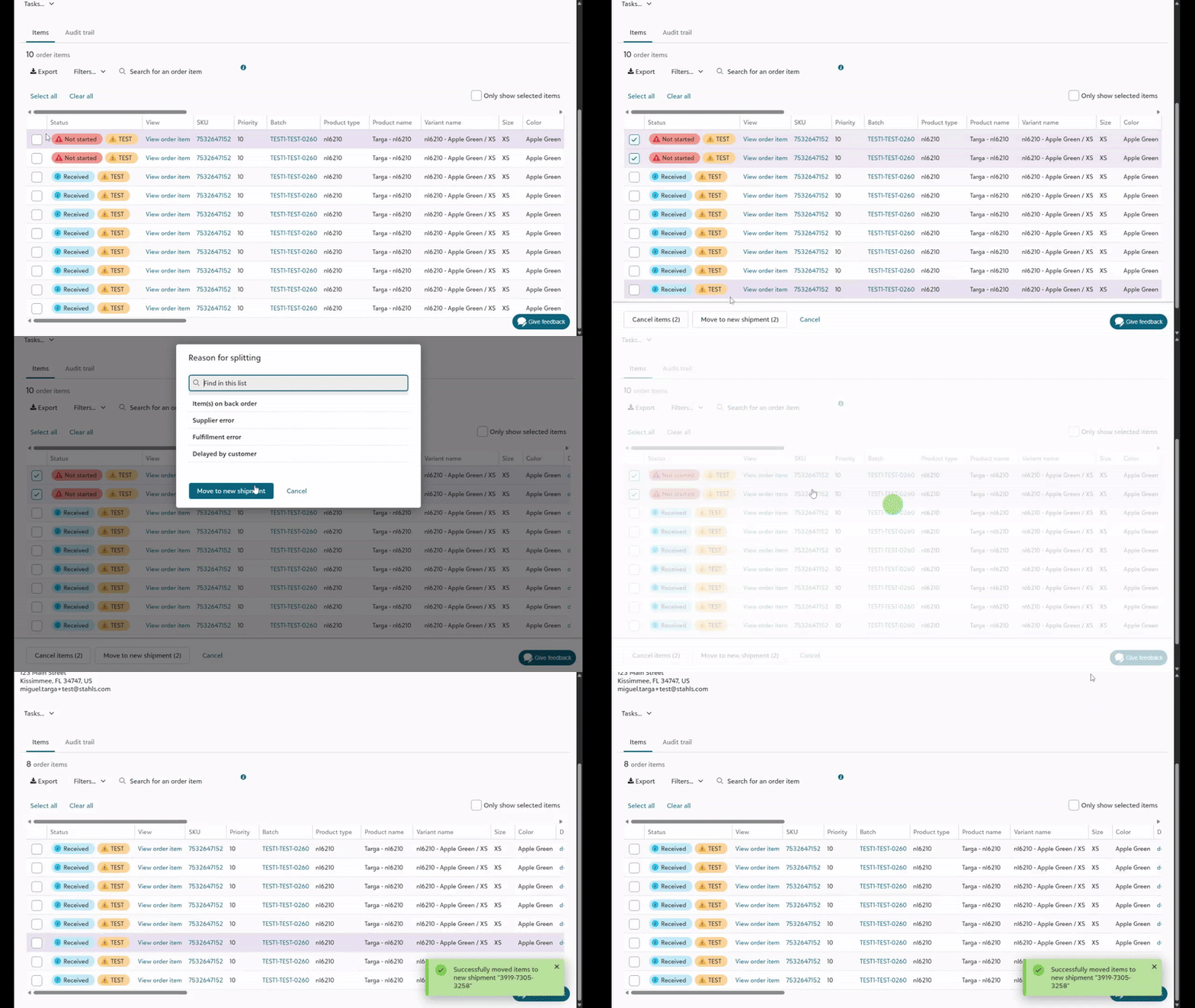
Note: Additional shipping costs incurred with split shipments will be charged to the associated ShipEngine account. These costs are not automatically passed on to the account or end customer. Use the Additional credits and charges feature on the account page to manually assign extra shipping costs to your customer accounts, if applicable.
Improved customs details on catalog products
We’ve added missing customs details - country of origin, HTS code, customs description - to over 6,000 products in the product catalog. We've also introduced background jobs to maintain complete and accurate customs details on catalog products. These improvements allow decorators to ship products internationally without disruption.
Disable auto-deleting files in DTG app
To facilitate testing mode with DTG printers, you can now disable auto-deleting artwork files in the DTG app settings.