This article is specific to Decorator Pro doing their own volume in-house.
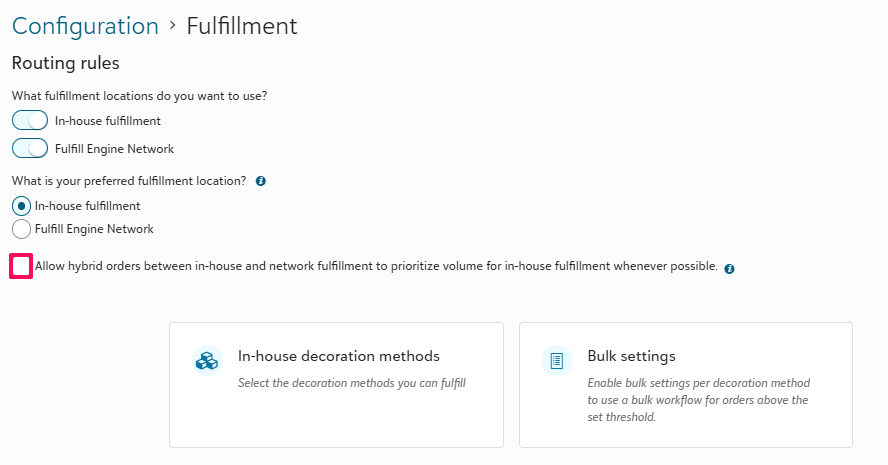
Order routing is based off the main configuration settings under Fulfillment → Routing Rules.
You will set your locations to In‑house and/or Fulfill Engine Network.
- If you select Fulfill Engine Network, routing is straightforward and nothing further needs to be configured.
- If you select In-house fulfillment, you will be prompted to confirm which decoration methods you support as well as the opportunity to set bulk thresholds.
- If you select both, you must then choose your preferred fulfillment location (in‑house or network)as well as confirm which decoration methods you support in-house.
- Based on your preferred location and the decoration methods supported in-house, the system will route orders appropriately.
Example - if you select in-house as your preferred fulfillment location, any order containing only items that can be fulfilled in‑house based on the decoration methods you selected, it will be routed to you for production.
If an order contains any item that cannot be fulfilled in‑house based on the decoration methods you provide, the entire order will be routed to the network unless hybrid routing is enabled.
- Based on your preferred location and the decoration methods supported in-house, the system will route orders appropriately.
Hybrid Routing
We support a hybrid option for routing orders which will split an order between in‑house and Network fulfillment. Checking this box will enable split fulfillment, meaning all order items that can be fulfilled by your preferred method (in‑house or network) will be routed there first, and the remaining items will route to the Network.
Hybrid orders will result in additional shipping costs to you and/or your customers.