Direct-to-Garment (DTG)
Direct-to-Garment, or DTG, is a decoration method that sprays water based ink directly onto the garment. The ink then soaks into the fibers of the garment and cures with the assistance of a pretreat. It is similar to printing on paper, but on fabric!
Since the ink is water based, 100% cotton garments are recommend. However, there are some blends within our catalog which have been tested and approved.
- Pros: DTG is ideal for natural materials like 100% cotton and can print on darker shades using white ink. It excels at producing precise prints of detailed, colorful designs and is perfect for small quantities as there is no minimum order requirement.
- Cons: This method is not compatible with polyester, tri-blend, or woven fabrics. Any artwork that has highlighter/neon colors will not transfer with this print method.
Preparing your art for DTG: Your file should be at least 300dpi with a minimum line weight of 1. Formatted as either .png .svg .ai .eps .pdf .psd, .tif, or .tiff file type.
Direct-to-Film (DTF)
Direct-to-Film, or DTF, is a decoration method where the ink is applied to a piece of film vs directly onto the fabric. This pre-printed film is adhered to the garment through heat and pressure from a heat-press machine.
Unlike DTG, you do not have the same fabric restrictions. This means you can utilize the DTF on-demand decoration with blended and polyester garments.
- Pros: DTF printing can be used on a variety of materials, including cotton, polyester, or blends. The process produces vibrant, durable prints. Similar to DTG, DTF is great for low volumes since it is available starting at orders of one.
- Cons: Exercise caution with solid designs that occupy a significant print area, as the print may not wear as comfortable. Any artwork that has highlighter/neon colors will not transfer with this print method.
Preparing your art for DTF: Your file should be at least 300dpi with a minimum line weight of 1. Formatted as either .png .svg .ai .eps .pdf .psd, .tif, or .tiff file type.
We do not guarantee PMS color output with digital prints. You should create your files off the CMYK build to ensure the closest color match.
Embroidery
We do not support 3D / Puff Embroidery at this time.
Embroidery is a popular decoration method where a machine uses a needle and thread to stitch a design and logos to hats, polos, hoodies, and more!
This method has grown in popularity within the on-demand market as a go-to method to provide an end client with a high quality decoration.
- Pros: An embroidered pattern utilizes thread, making it resilient to everyday maintenance and laundering. It has a significant professional appearance and is effective on sturdy fabrics like fleece or thick cotton. Additionally, it is ideal for small quantities as there is no minimum order requirement.
- Cons: The embroidery technique is unable to replicate certain intricate details as effectively as other decoration methods. Using needle and thread restricts the artwork to sharp edges. Additionally, the ability to achieve fading, shading, and gradation is quite limited with embroidery.
Preparing your art for Embroidery: Your file must be digitized in .dst format prior to starting your order. When selecting a file for embroidery, you should eliminate any small details or fonts which may be unable to translate when sewn out.
Embroidery requires a DST file. If you do not have the file, you can submit a request for us to digitize here.
Our digitizing services are a flat $20 fee per file and the file will be provided to you.
To maintain consistent quality and production efficiency across the Fulfill Engine Network, we have a 25,000 stitch count limit on all embroidery orders. Orders exceeding this limit will not be eligible for network fulfillment.
Screen Print *Exclusive to Order Now
Screen printing is a printing technique that uses a stencil and mesh screen to transfer an image. Our screen printing is done with plastisol based ink which is made from PVC resin and plasticizer, and is thicker and more opaque than water-based inks.
- Pros: Ideal for large orders, it offers excellent value for money while maintaining high quality. Additionally, it produces prints that are long-lasting and durable enough to endure frequent washing.
- Cons: Has a minimum-order-quality of 24 units as well as you may be limited with your design and color count.
Preparing your art for Screen Print: Your file should be at least 300dpi with a minimum line weight of 1 and without gradients. Formatted as either .png .svg .ai .eps .pdf .psd, .tif, .tiff
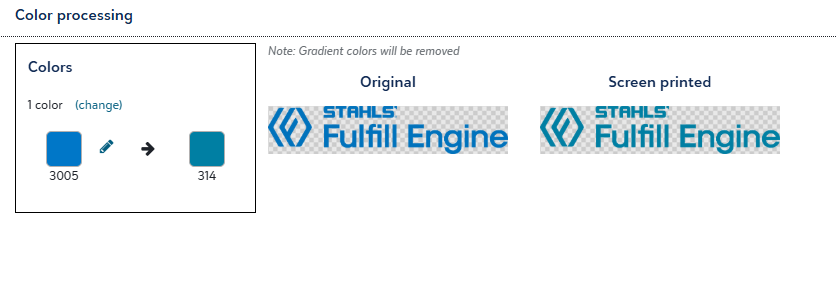
When uploading artwork, the system will automatically identify and suggest PMS (Pantone Matching System) color codes based on the colors detected in your file. Please review and confirm that the suggested PMS codes are accurate before proceeding with your order.
If any color adjustments are required, a visual proof will be provided for your review and approval prior to proceeding with the order.
Laser Engraving
Laser Engraving is a decoration method where the laser acts as a chisel, incising marks by removing layers from the surface of the material. The laser hits localized areas with massive levels of energy to generate the high heat required for vaporization.
Popular products to Engrave would be drinkware, cutting boards, and other accessories.
- Pros: Laser engraving produces a sharp and precise finish, making it ideal for detailed or tiny designs. It's particularly suitable for small quantities as there is no minimum order requirement.
- Cons: Laser engraving may be less effective on irregularly shaped items or softer metal materials.
Preparing your art for Laser Engraving: Laser Engraving restricts your art to be formatted as one color.
UV Direct-to-Film (UV DTF)
UV Direct-to-Film (UV DTF) is a digital printing technique that uses a UV printer to create a sticker-like transfer that can be applied to a variety of surfaces where a UV printer prints an image onto a release film using UV-curable ink. The printed image is then transferred from the film to a substrate using an adhesive backing.
- Pros: Used with non-flexible surfaces such as drinkware. Great for low volumes since there is no MOQ. It is water resistant, scratch resistant, and wear resistant.
- Cons: This process may not be suitable for certain materials or products, limiting its versatility. Any artwork that has highlighter/neon colors will not transfer with this print method.
Preparing your art for UV DTF: Your file should be at least 300dpi.
Designs with thin isolated lines that are not on top of a background may have excess clear material showing around them in order to create enough surface area to stick properly to the item.
LIQUID 3D™
Exclusive to Fulfill Engine, LIQUID 3D™ redefines dimensional emblems and unlocks on-demand decoration without costly setups or minimum quantity requirements. This innovative patent-pending technology from STAHLS' combines high-definition, full color 3D printing with versatile finishes and textures that make any logo look and feel like nothing else.
- Pros: Premium dimensional emblems that make your branding more memorable, more valuable, and more impactful on headwear and bags. No minimum orders.
- Cons: Eligible for headwear and bags only at this time. Requires a vector .pdf artwork file to convert to a 3D print file.
Preparing your art for LIQUID 3D: Your file must be a vector .pdf format to upload successfully in the real-time LIQUID 3D artwork builder. Additional tips to prepare your file.
-
Use vector software like Adobe Illustrator or CorelDRAW to build and prepare your design.
- Resize your artwork to fit within 2.375" x 4" (or 4" x 2.375").
- Outline all fonts to avoid font substitution issues.
- Remove hidden layers or effects that may not translate in production.
- Avoid embedded raster images — ensure all elements are vector paths.
- Use solid fills only; avoid gradients, shadows, transparency, or glow effects.
- Expand any strokes so they become shapes rather than editable stroke effects.
- Export as a true vector PDF — all elements must be vector-based, and the file should be saved as PDF/X‑1a or a PDF with Illustrator editing capabilities for best compatibility.