Since everything is custom decorated, our system removes the option for the end customer, or an Account/Store Administrator to cancel an order once it is already in production. Before that, there is an option to cancel and be auto refunded.
As a Sales Portal Administrator, you will have the ability to cancel an order at any time. However if the order is canceled after blanks have been ordered, an automatic refund will not be issued.
The end customer can cancel from the confirmation email
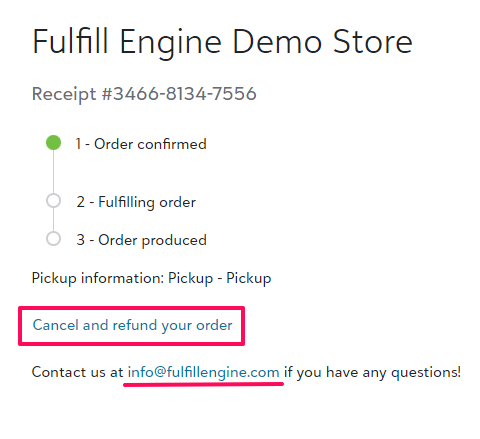
When an order is placed, the end customer will receive a confirmation email with the order details and a link to "Track and manage your order."
From there they will be able to view the status at a high level. As long as the order is in confirmation status, they will see the option to "Cancel and refund". This option is removed once the status changes to "Fulfilling order."
The contact us email will be the contact email address listed within the branding section on the white-label store.
Account/Store Administrator canceling from the order view
This applies if you give access either at the Account or a Store level to your customer. They would not hold the same access you do as a Sales Portal Administrator, but will have the ability to cancel orders on behalf of the end customer.
An Account/Store administrator will have the option to cancel an order from the Account/Store view within the order id by selecting the Tasks dropdown located under the address and select Cancel order.
Once canceled, an automatic refund will be issued to the original payment method as long as the batch containing that order has not been closed.
Canceling an order as a Sales Portal Administrator
From the same view an Account/Store Administrator has, you have the option to "Cancel without a refund" after the order has started. The verbiage of "without a refund" is because the connection which would automatically refund is no longer available.
If a refund is needed, you will need to issue it manually outside of Fulfill Engine - likely through Stripe.